
How to choose a SaaS website template for your product
Choose a SaaS marketing template with a real source workflow. A practical guide using inspected Flowmint and Markwell React packages, content files and deployment boundaries.
By Templa · 5 min read · · Updated
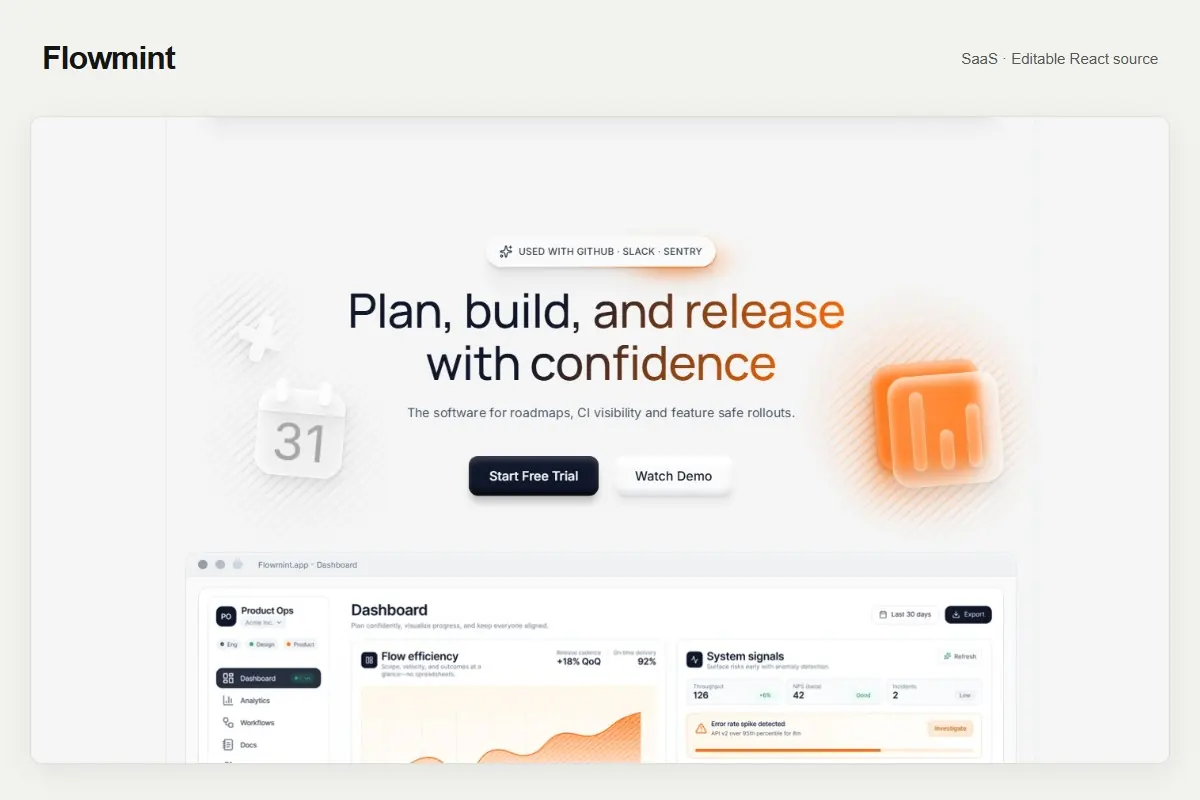
What you are choosing
A SaaS website template gives your product a public presentation: an explanation, screenshots, pricing context and paths to a demo or trial. It does not automatically supply the software behind that presentation. Start by separating the marketing website you need from the application you already operate.
This guide uses two actual Templa downloads, Flowmint and Markwell. We inspected their source packages and README files on 9 October 2026. Both are editable React/Vite projects. Flowmint was recovered from a Framer presentation; Markwell from a Webflow presentation. Neither download is the original platform editor project, a working SaaS backend or a connected CMS.
Write a brief before choosing a layout
Describe the customer, the problem, the product's main outcome and the action you want a visitor to take. A scheduling tool, a finance dashboard and a team workflow product need different evidence even when all three fit the SaaS category. Choose a template around your actual story, rather than trying to fill every available section.
Collect these inputs before you start:
- A one-sentence explanation of the product, written for the buyer.
- Accurate screenshots you can publish without exposing customer data.
- A genuine demo, trial, waitlist or contact destination.
- The plans and limitations you actually offer.
- Real customer quotations or permission to publish them, if available.
- The pages your buyer needs to evaluate the product and contact you.
Sample reviews, figures and company names are design placeholders. Replace them with truthful material or remove the corresponding section. A template does not establish evidence for a claim about security, adoption or time saved.
Compare Flowmint and Markwell through their content
Flowmint is a focused showcase for a planning and workflow product. Its package keeps articles in src/content/articles.js, policy examples in src/content/policies.js, and route entries in src/content/staticRoutes.json. These files are useful when your product story includes updates, explanations and supporting pages. Article data is local; it is not connected to the original Framer CMS.
Markwell is a colorful product website for SaaS teams. Its README describes editable JSX layouts, centralized text and media, and retained local styles. It also identifies motion configuration in src/content/animations.js and route-specific runtime scripts. If your team plans to change motion, inspect those sources together instead of assuming every animation is controlled by a single setting.
Open both live previews. Compare how your explanation, screenshots and primary call to action would fit on a narrow screen. Confirm the actual included pages on the product details before purchase. Their category describes their intended use, not an application feature list or a universal compatibility guarantee.
Understand the source you will maintain
The inspected packages use these editing areas:
| Change | Source to inspect |
|---|---|
| Text and links | src/content/siteContent.js |
| Images and video references | src/content/media.js and local files in public/ |
| Page sections and layout | JSX under src/sections and src/components; follow each route's imports |
| Styles | src/styles/ and retained local public CSS |
| Motion | src/content/animations.js, JSX and any runtime scripts identified by the route |
The README uses broad layout descriptions; follow the actual import graph in your download when locating a page. Keep stable element IDs and interaction attributes while changing content. Do not reorganize files first and hope all imports, links and motion selectors will adjust automatically.
Run a clean preview and make small changes
Extract the ZIP, open a terminal in the folder containing package.json, and read that package's README and engine requirements. The inspected README files recommend Node.js 24, tested during their preparation. Use the locked dependency installation before making changes:
npm ci
npm run dev
For the files inspected here, Flowmint declares React 18.2.0 and Markwell React 19.2.4. Do not replace those versions merely to make the numbers match. A major dependency upgrade is a separate change that needs its own verification.
Change the brand name, main heading and primary destination first. Then replace screenshots, product explanations, plans and supporting content in a separate pass. Keep a backup or a version-control checkpoint before each substantial step. The React launch guide covers the overall preparation process.
Connect real services deliberately
The packages' README files identify forms, accounts, payments and backend services as demo boundaries. A button that looks like a trial button is not proof that user creation exists. A pricing section does not create a subscription. Local form feedback does not mean an enquiry was delivered.
Map each visible action to the real service that will handle it. Authentication should be connected to your application's verified login flow; payments need server-side confirmation before granting access. Keep service secrets on the server. Remove or clearly label unfinished actions in a public launch.
Replace sample policy text with documents appropriate to your own operating business. When you add analytics or email collection, explain the actual services and choices. Avoid copying another business's claims or promising certifications you have not obtained.
Build and verify the deployed routes
Both inspected packages build with vite build && node tools/write-routes.mjs. Run the complete script:
npm run build
npm run preview
The route-writing step creates static entry documents. Deploy the generated dist/ folder at the hosting root and retain its structure. Open an inner page directly, refresh it, follow navigation and test the real enquiry or trial destination. A working homepage alone does not verify deployment.
Review mobile screenshots, readable text, focus indicators and animation preferences. Follow the image optimization guide to inventory actual files and requests. There is no measured speed comparison between Flowmint and Markwell in this article, and no claim that either will produce more sales without testing your content and audience.
Make a practical choice
Choose the presentation that fits your product explanation and the source workflow your team can maintain. Browse the SaaS collection, examine the included pages and confirm the download format. If you need implementation help, Templa custom services can start with a brief covering content, integrations and deployment checks.
This article was AI-assisted and reviewed against the two inspected package manifests and README files. It explains a marketing-site workflow; it does not report a live backend integration or a fresh build of both template downloads.
Questions & answers
Does a SaaS template include a working software application?
Not in the inspected Flowmint and Markwell downloads. Their README files describe a React marketing website with demo forms and content. Authentication, payments, a production CMS and a SaaS backend require your own integrations.
Can I edit these example downloads in Framer or Webflow directly?
The inspected packages are React/Vite source, not the original Framer or Webflow editor projects. Verify a supported native project is explicitly included if platform-native editing is required.
Where do I change text and images?
In the inspected packages, start with src/content/siteContent.js for text and links, and src/content/media.js plus public assets for images. Follow the route imports for JSX and style changes.
How should I deploy the inspected projects?
Run the complete npm run build script, which invokes Vite and the route-writing tool. Deploy the generated dist folder at the hosting root without flattening it, then test direct inner-page refreshes.